Payoneer Account Review 2026: Fees, Features, Pros & Cons for Freelancers and Global Businesses

Getting paid internationally should be simple in 2026.
But for millions of freelancers, Amazon sellers, remote workers, and online business owners, international payments are still frustratingly complicated.
Traditional banks charge high transfer fees, international wires take days to arrive, and platforms like PayPal are either unavailable or expensive in many countries.
That’s exactly why Payoneer became one of the most widely used payment platforms in the world.
For years, Payoneer has helped freelancers and businesses receive payments globally through local receiving accounts, marketplace integrations, and cross-border payout systems.
If you work on:
- Fiverr
- Upwork
- Amazon
- Airbnb
- Freelancer.com
- Shopify
- International agencies
There’s a good chance you’ve either used Payoneer already or considered opening an account.
But things have changed significantly over the last few years.
New competitors like Wise and Revolut now offer cheaper currency conversion, faster transfers, and more modern financial tools.
So the big question is:
Is Payoneer still worth using in 2026?
Or has it become too expensive compared to newer fintech platforms?
In this complete Payoneer review, we’ll cover everything you need to know, including fees, features, transfer speed, hidden costs, real-world usability, pros and cons, and whether Payoneer is still the best option for freelancers and international businesses.
What Is Payoneer?
Payoneer is a global payment platform designed for international money transfers and cross-border business payments.
Unlike traditional banks, Payoneer focuses specifically on helping users receive and send international payments more easily.
The platform allows users to:
- Receive payments from international clients
- Get local receiving bank details
- Withdraw money to local bank accounts
- Hold multiple currencies
- Pay contractors and suppliers globally
- Receive payouts from online marketplaces
One important detail:
Payoneer is not a traditional bank.
It operates as a fintech payment platform and financial services provider.
That means its primary goal is simplifying international payments rather than offering full banking services.
Why Payoneer Became So Popular
Payoneer grew rapidly because it solved a major problem for freelancers and online businesses in developing countries.
For many users globally, especially in countries like Pakistan, Bangladesh, India, the Philippines, and parts of Africa:
- PayPal support was limited
- International banking was difficult
- SWIFT transfers were expensive
- Local banks were unreliable for foreign payments
Payoneer created a much simpler solution.
Instead of relying on complicated international wire systems, users could receive payments through local receiving accounts in major currencies.
That made Payoneer extremely popular among:
- Upwork freelancers
- Fiverr sellers
- Amazon FBA sellers
- Affiliate marketers
- Remote employees
- Online agencies
Even today, it remains one of the easiest ways for freelancers to receive international payments in many countries.
Payoneer Supported Countries and Currencies
One of Payoneer’s biggest strengths is global accessibility.
The platform supports users in more than 190 countries worldwide.
This is a huge advantage because many fintech alternatives still have limited availability.
Supported Currencies
Payoneer supports several major international currencies, including:
- USD
- EUR
- GBP
- AED
- JPY
- CAD
- AUD
- SGD
Users can receive payments using local bank details in major currencies, which makes international transactions feel much more local and seamless.
For example:
A freelancer in Pakistan can receive USD payments from a US client using US receiving account details instead of expensive wire transfers.
That convenience is one of Payoneer’s biggest advantages.
Payoneer Fees in 2026: The Real Cost Breakdown
Fees are the most important part of any Payoneer review.
At first glance, Payoneer looks affordable.
But many users eventually discover that the real costs are hidden inside exchange rates and withdrawal conversions.
Let’s break everything down clearly.
Account Opening Fees
Opening a Payoneer account is free.
There are no setup charges for standard accounts.
This makes it accessible for freelancers and small businesses getting started online.
Annual Account Fees
Unlike some fintech platforms, Payoneer does not charge a standard monthly subscription fee.
However, there is an important condition many users overlook.
If your account receives less than approximately $6,000 annually, Payoneer may charge an annual maintenance fee of around $29.95.
For active freelancers and businesses, this usually isn’t a problem.
But for casual or inactive users, it’s worth knowing.
Receiving Payment Fees
The cost of receiving money depends heavily on how the payment arrives.
Receiving from Another Payoneer User
Usually free.
This is one reason many freelancers prefer working with clients who already use Payoneer.
Receiving via Credit Card Payments
Clients paying through card systems may trigger fees up to around 3.99%.
This is relatively high compared to some alternatives.
Receiving via Bank Transfers
Bank transfer receiving fees are often around 1%.
The exact amount depends on:
- Currency
- Country
- Payment method
- Marketplace integration
Sending Payment Fees
Payoneer allows users to send money globally as well.
To Other Payoneer Users
Often free or low-cost.
To Bank Accounts
Usually more expensive.
Fees can range between:
- 1%
- Up to 4% in some corridors
This is one area where Payoneer can become costly for businesses making frequent payouts.
Currency Conversion Fees
This is where most users lose the most money.
And many people don’t even realize it.
Payoneer’s visible transfer fee may appear small, but the exchange rate spread can significantly reduce your actual payout.
Typical FX conversion costs include:
- Around 0.5% internal conversion markup
- Up to 2%+ during withdrawals in some situations
That may not sound huge initially.
But for freelancers receiving thousands of dollars monthly, these costs add up very quickly.
For example:
A freelancer earning $3,000 monthly could lose hundreds of dollars annually simply through currency conversion spreads.
Withdrawal Fees
Withdrawal costs depend on how funds are converted and transferred.
Same-Currency Withdrawals
Typically around:
- $1.50 per transaction
Cross-Currency Withdrawals
These can become much more expensive due to FX conversion spreads.
In some cases:
- Up to 2% additional cost
This is one of the biggest complaints users have about Payoneer in 2026.
Payoneer Card Fees
Payoneer also offers a prepaid Mastercard for spending and ATM withdrawals.
While convenient, the card is not cheap.
Common fees include:
- Annual card fee: around $29.95
- ATM withdrawal fee: around $3.15
- Foreign transaction costs
- Currency conversion charges
The card is useful for convenience but not necessarily cost-efficient.
Hidden Costs Most Users Ignore
This is where things become extremely important.
Many users think Payoneer charges only small transaction fees.
But the real total cost often becomes much higher once you include:
- FX conversion markup
- Withdrawal spreads
- Card fees
- ATM charges
- Marketplace withdrawal deductions
In practice, some freelancers estimate the true all-in cost reaches:
- 3% to 5% total
That’s why many cost-sensitive users eventually explore alternatives like Wise.
Payoneer Transfer Speed
Speed is another major reason why people still use Payoneer.
Payoneer to Payoneer Transfers
Usually instant.
This is extremely useful for agencies, freelancers, and online teams working internationally.
Bank Withdrawals
Typically:
- 1 to 3 business days
That’s generally faster than traditional international bank wires.
However, some fintech competitors now offer even faster settlement speeds in certain countries.
Payoneer Transfer Limits
Payoneer supports relatively high transaction limits for business users.
This makes it suitable for:
- Amazon sellers
- Agencies
- Online marketplaces
- High-volume freelancers
- Digital businesses
Compared to some newer fintech apps, Payoneer remains quite scalable for larger payment volumes.
Payoneer Mastercard Review
The Payoneer prepaid Mastercard remains one of the platform’s most recognizable features.
It allows users to:
- Spend internationally
- Withdraw cash from ATMs
- Make online purchases
- Access earnings quickly
For users in countries with limited banking infrastructure, this can still be incredibly useful.
However, the downside is the fee structure.
ATM fees, currency conversion charges, and annual maintenance costs can make the card expensive over time.
For occasional convenience, it works well.
For daily spending, cheaper fintech alternatives may be better.
Payoneer Mobile App & Dashboard
Payoneer has improved its interface significantly over the years.
The dashboard now includes:
- Multi-currency balances
- Payment tracking
- Withdrawal management
- Marketplace integrations
- Transaction history
- Global payment requests
The mobile app is generally stable and functional for most users.
Compared to older banking systems, Payoneer feels much more modern and user-friendly.
Is Payoneer Safe?
Security is one of the platform’s stronger areas.
Payoneer operates globally under financial regulations and compliance systems.
Security features include:
- KYC identity verification
- Fraud prevention systems
- Encrypted infrastructure
- Transaction monitoring
Millions of users and businesses rely on Payoneer worldwide.
That said, there is one recurring complaint:
Account reviews and temporary restrictions.
Some users report:
- Verification delays
- Sudden account reviews
- Temporary fund holds
These situations can be frustrating, especially for freelancers depending on regular payouts.
Still, this is fairly common across regulated fintech platforms.
Who Should Use Payoneer?
Payoneer works best for users who primarily need to receive international payments.
Best For
Freelancers
Especially users on:
- Fiverr
- Upwork
- Freelancer.com
Amazon Sellers
Amazon marketplace integrations remain one of Payoneer’s strongest use cases.
Agencies
Useful for handling international client payments and contractor payouts.
Online Businesses
Especially companies receiving international revenue from multiple countries.
Who Should Avoid Payoneer?
Despite its popularity, Payoneer is not ideal for everyone.
Not Best For
Cost-Sensitive Users
If minimizing FX fees is your top priority, Wise is often cheaper.
Frequent Currency Conversions
Payoneer’s exchange rate markup can become expensive over time.
Small Casual Transfers
The fee structure may not make sense for low-volume users.
Users with Access to Better Alternatives
In countries where Wise or Revolut are fully available, many users now prefer those platforms.
Payoneer vs Wise
Wise is currently one of Payoneer’s biggest competitors.
Wise is usually better for:
- Lowest FX costs
- Transparent exchange rates
- International transfers
- Currency conversion savings
Payoneer is usually better for:
- Marketplace integrations
- Freelancer ecosystems
- Receiving payments from platforms
- Countries with limited banking access
Key Difference
Wise focuses heavily on cheap transfers.
Payoneer focuses more on payment receiving infrastructure.
Payoneer vs Revolut
Revolut offers more modern personal finance tools.
Revolut is excellent for:
- Travel spending
- Personal banking
- Daily usage
- Currency exchange
Payoneer remains stronger for:
- Freelancer payouts
- Marketplace payments
- Amazon seller workflows
Real User Experience With Payoneer in 2026
User opinions about Payoneer are mixed.
Many freelancers still rely on it daily because it works reliably in regions with limited alternatives.
Common positive feedback includes:
- Easy marketplace integration
- Wide country support
- Reliable payment receiving
- Good for international clients
Common complaints include:
- High hidden FX costs
- Account verification delays
- Customer support frustrations
- Expensive withdrawals
The reality is this:
Payoneer remains extremely useful, but it is no longer the cheapest platform available.
How to Open a Payoneer Account
Opening an account is relatively simple.
Step 1: Register Online
Create an account through the official website.
Step 2: Verify Identity
You’ll typically submit:
- Government ID
- Personal information
- Business details if applicable
Step 3: Link Your Bank Account
Add your local withdrawal bank account.
Step 4: Start Receiving Payments
Once approved, you can receive international payments through supported methods.
Verification may take:
- A few days
- Sometimes longer during manual reviews
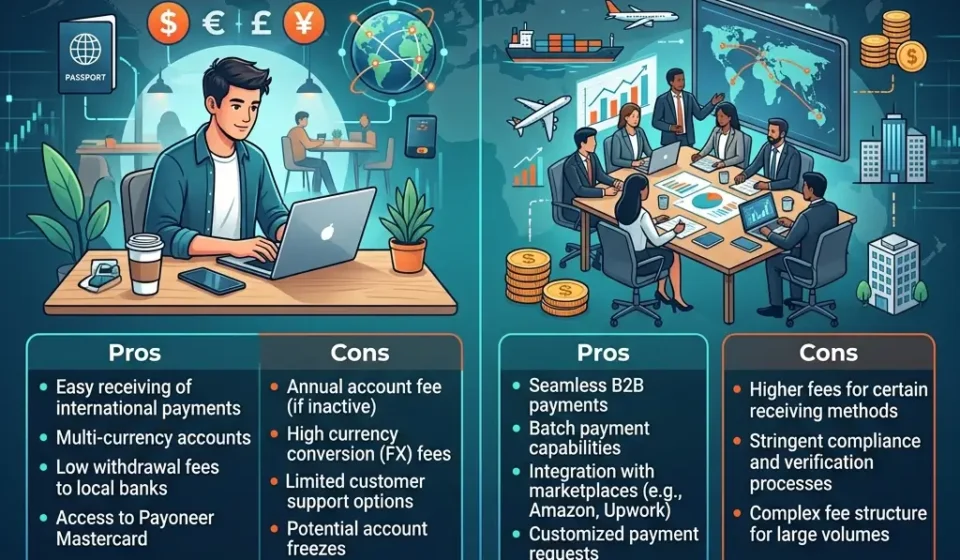
Payoneer Pros and Cons
Pros
Extremely Global Availability
Works in more countries than many competitors.
Trusted by Major Marketplaces
Strong integrations with platforms like Amazon and Fiverr.
Multi-Currency Receiving Accounts
Very useful for freelancers and businesses.
High Transaction Limits
Suitable for growing businesses.
Simple International Payment Receiving
Especially valuable in countries with limited fintech access.
Cons
Hidden FX Costs
The biggest downside for many users.
Expensive Withdrawals
Especially cross-currency withdrawals.
Annual Fees
Inactive users may still pay yearly charges.
Verification Delays
Some accounts experience long review periods.
Not the Cheapest Option Anymore
Wise often beats Payoneer on pure transfer cost.
Final Verdict: Is Payoneer Worth It in 2026?
Yes — but only for the right type of user.
Payoneer still remains one of the best platforms for:
- Freelancers
- Amazon sellers
- Marketplace users
- International payment receiving
Especially in countries where banking alternatives remain limited.
Its biggest strengths are:
- Global availability
- Marketplace integrations
- Multi-currency receiving
- Ease of international payments
However, the platform has become noticeably more expensive over time.
If your main priority is:
- Lowest fees
- Best exchange rates
- Cheap currency conversion
Then Wise may offer better value.
But if you need:
- Reliable international payment receiving
- Marketplace compatibility
- Access in countries with fewer options
Then Payoneer is still one of the strongest global payment platforms available in 2026.